






Description
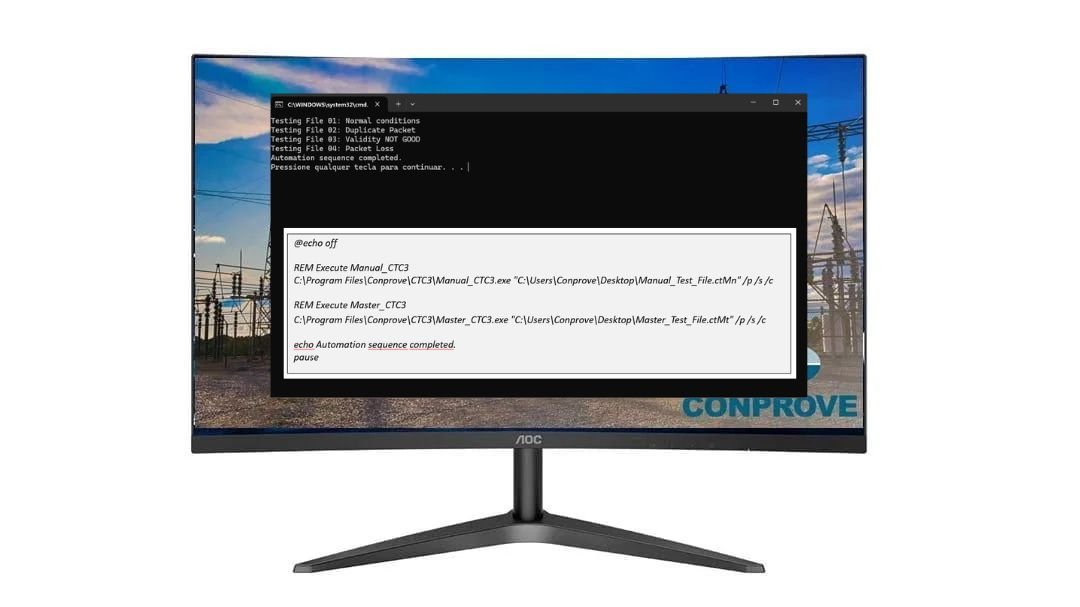
Command-Line Automation is a native command-line interface that allows you to call and execute any software from the CTC suite: Quick, Master, Overcurrent, Distance, Manual, and others, directly from a user-created script, without any manual intervention during execution.
The test file must be configured and validated beforehand by the operator.
Once ready, simply include it in the automation script for the software to execute, save, and close completely autonomously.
As testing processes in electrical power system protection and automation become more frequent and complex, whether in factory production lines, R&D laboratories, universities, or in the conduction of master’s dissertations and doctoral theses, the need to execute repeatable test sequences without manual intervention has ceased to be a differentiator and has become a requirement.
Command-Line Automation responds directly to this demand: any software from the CTC suite can be called and executed from a user-created automation script, with test files already configured and validated beforehand.
Command-Line Automation operates via a native command-line interface.
This makes the solution completely language-agnostic: it can be integrated with Python, C#, MATLAB, LabVIEW, Java, PowerShell, Bash, Node.js, or any environment capable of invoking an operating system process.
There is no installation of additional libraries, nor dependency on third-party SDKs;
only the CTC executable responding to standardized parameters (/p, /s, /c, /k), providing complete freedom for the engineer or researcher to build their own automation layer.
Command-Line Automation can be used in:
• 🏭 Factory processes and batch testing (serial testing, production line)
• 🔬 Research & Development in protection and automation laboratories
• 🎓 Universities, master’s dissertations, and doctoral theses
• 🔗 Interoperability testing with multiple manufacturers (e.g., IEC 61850)
• ⚙️ Integration with test automation frameworks
• 📋 Scripts for firmware validation and relay updates
Code line example:
@echo off
REM File01 — Normal conditions
“C:\Program Files\Conprove\CTC3\Master_CTC3.exe” “C:\Users\Conprove\Desktop\Test_File_01.ctMt” /p /s “C:\Users\Conprove\Desktop\01.ctMt” /cREM File02 — Duplicate Packet
“C:\Program Files\Conprove\CTC3\Master_CTC3.exe” “C:\Users\Conprove\Desktop\Test_File_02.ctMt” /p /s “C:\Users\Conprove\Desktop\02.ctMt” /cREM File03 — Validity NOT GOOD
“C:\Program Files\Conprove\CTC3\Master_CTC3.exe” “C:\Users\Conprove\Desktop\Test_File_03.ctMt” /p /s “C:\Users\Conprove\Desktop\03.ctMt” /cREM File04 — Packet Loss (Manual)
“C:\Program Files\Conprove\CTC3\Manual_CTC3.exe” “C:\Users\Conprove\Desktop\Test_File_04.ctMn” /p /s “C:\Users\Conprove\Desktop\04.ctMt” /cecho Automation sequence completed.
pause





Reviews
There are no reviews yet.